From Zero to GKE — A Terraform-First Build with Production in Mind
I’ve always wanted to keep the option of multi-cloud open.
Not as a buzzword, but as a practical decision. At one point, I was close to joining a team that was deeply invested in Azure. That didn’t happen, but it made something clear: I shouldn’t anchor myself to a single platform.
So this is me doing something about it.
I’m learning GCP and GKE from scratch — but with a constraint. Everything I build should have a clear path to production. Not necessarily production-ready on day one, but structured in a way that doesn’t need to be rewritten later.
That changes how I approach things.
Instead of clicking around the console to get something working quickly, I’m building everything with Terraform. Instead of jumping straight into Kubernetes, I’m putting structure in place first. Instead of optimizing early, I’m trying to understand the system well enough that the next step is always intentional.
This is not a guide. It’s a record of how I’m figuring things out — one layer at a time — with the assumption that whatever I build today should still make sense when it grows up.
Preparing the environment
Before writing any Terraform, I needed a working connection to GCP.
Terraform relies on Application Default Credentials, so this step isn’t optional — it’s how the provider knows who you are and what you’re allowed to do.
I kept it minimal:
gcloud config set project <project-id>
gcloud auth application-default login
That was enough for Terraform to start provisioning resources without additional configuration.
There’s also a small detail specific to GKE. kubectl doesn’t talk to GKE directly — it relies on a plugin provided by the Google Cloud CLI. I found out this part until the cluster was ready.
So be sure to install the following plugin:
gcloud components install gke-gcloud-auth-pluginWith that in place, I could move on to defining infrastructure.
Starting from zero (including Terraform itself)
Terraform has an awkward starting point. It needs a place to store state, but that place doesn’t exist yet.
A common workaround is to create a storage bucket manually and move on. That works, but it breaks the idea of infrastructure being fully reproducible.
So I started with a small bootstrap layer — just enough to define the state bucket in code.
resource "google_storage_bucket" "tf_state" {
  name     = var.bucket_name
  location = var.location

  versioning {
    enabled = true
  }

  uniform_bucket_level_access = true
}
This step still uses local state, and that’s intentional. It’s temporary and only exists to create the remote backend.
Once the bucket is in place, Terraform moves to remote state, and from that point on, everything is tracked consistently.
It’s a small detail, but it sets the tone for everything that follows.
Building structure before touching Kubernetes
It’s tempting to go straight to “create cluster.” I almost did. But GKE relies heavily on networking, and skipping that layer usually leads to confusion later.
So I introduced a foundation layer first.
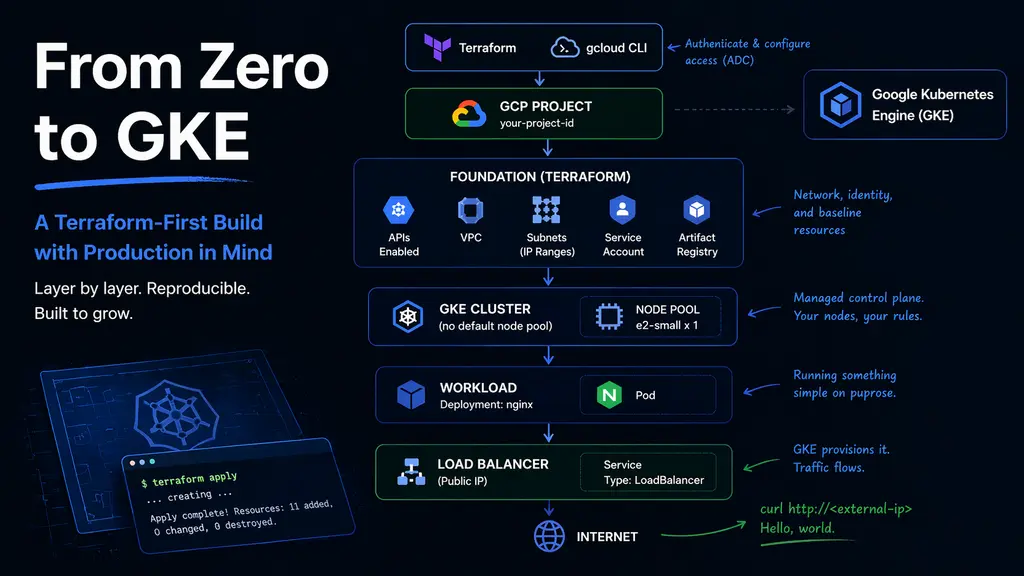
This layer handles:
- enabling required APIs
- defining a VPC
- creating a subnet
- reserving IP ranges for pods and services
- preparing a service account for nodes
- setting up a container registry
The subnet configuration is more important than it looks. GKE uses secondary IP ranges to separate pod and service networking, and getting this right early avoids having to revisit it later.
resource "google_compute_subnetwork" "subnet" {
  ip_cidr_range = "10.0.0.0/20"

  secondary_ip_range {
    range_name    = "pods"
    ip_cidr_range = "10.1.0.0/16"
  }

  secondary_ip_range {
    range_name    = "services"
    ip_cidr_range = "10.2.0.0/20"
  }
}
What I like about this step is what it doesn’t introduce.
No compute. No cluster. No external exposure.
Just structure.
It’s a clean checkpoint that can be applied, reviewed, and trusted before moving forward.
A Terraform layout that doesn’t fight you later
I spent more time than expected thinking about how to organize the code.
What I ended up with is intentionally simple:
terraform/
  bootstrap/
  modules/
  live/
    dev/
      foundation/
      gke/
The key idea is separation.
The foundation layer and the GKE layer live in separate Terraform states. They’re connected through remote state, but they don’t overlap.
That means changes to networking don’t accidentally impact the cluster, and changes to the cluster don’t rewrite the base infrastructure.
It’s not overly engineered, but it creates just enough boundary to keep things predictable.
Creating the cluster without defaults
GKE will happily create a cluster with a default node pool. I chose not to use it.
Instead, I removed the default node pool and defined my own. It’s a small decision, but it gives control over what actually runs in the cluster.
resource "google_container_cluster" "cluster" {
  remove_default_node_pool = true
  initial_node_count       = 1
}

resource "google_container_node_pool" "nodes" {
  node_config {
    machine_type = "e2-small"
  }

  node_count = 1
}
I started with a minimal x86 node. Not because it’s the final choice, but because it keeps things predictable while I’m still building the mental model.
There’s enough complexity already — no need to introduce more variables too early.
The moment it becomes real
After applying the cluster configuration, everything still feels abstract.
Until this:
kubectl get nodesAnd suddenly there’s a node, marked Ready.
That’s the moment it shifts from configuration to system.
Putting something on it
A cluster without a workload is just potential.
So I deployed the simplest thing possible — nginx.
apiVersion: v1
kind: Namespace
metadata:
  name: janus-test
---
apiVersion: apps/v1
kind: Deployment
metadata:
  name: hello
  namespace: janus-test
spec:
  replicas: 1
  selector:
    matchLabels:
      app: hello
  template:
    metadata:
      labels:
        app: hello
    spec:
      containers:
        - name: hello
          image: nginx
          ports:
            - containerPort: 80
---
apiVersion: v1
kind: Service
metadata:
  name: hello
  namespace: janus-test
spec:
  type: LoadBalancer
  selector:
    app: hello
  ports:
    - port: 80
      targetPort: 80
GKE handles the rest. A public endpoint appears, backed by the cluster.
A quick request test:
- Get the external-ip:
kubectl get svc -n janus-test- Make the request:
curl http://<external-ip>And it responds.
No ingress. No domain. No TLS. Just a direct path from the internet to a container.
Simple, but complete.
What stood out
A few things became clearer through this process.
The control plane is almost invisible. You don’t manage it, and you don’t need to. Most of the meaningful decisions happen around node pools and networking.
The cluster itself is less interesting than expected. The node pool defines behavior — architecture, capacity, scheduling. That’s where the real control lives.
And GKE does a lot quietly. Creating a LoadBalancer service results in real infrastructure being provisioned behind the scenes. It feels seamless, but there’s quite a bit happening under the hood.
What I deliberately avoided
There’s a long list of things I didn’t touch yet:
- private clusters
- NAT configuration
- ingress controllers
- TLS and domains
- autoscaling
- identity integration
Not because they’re optional, but because they add layers.
For now, I wanted a clear understanding of the fundamentals before stacking more complexity on top.
This is the point where the cluster stops being theoretical.
It exists. It runs workloads. It responds to requests.
And more importantly, it can be rebuilt — entirely from code.
That’s the baseline I was aiming for.