GKE Part 8: Move the Volume, Not the Container
As part of my ongoing migration from EKS to GKE, I needed to move an application whose state lived on a Kubernetes PersistentVolumeClaim. The manifests and container image were easy to reproduce in the new cluster, but the files inside the volume still had to cross the boundary safely.
The problem felt familiar. I had handled something similar at a previous company, and it came up again while rebuilding my homelab platform. In Homelab Arena Part 7, I wrote about separating application data from compute and giving persistent workloads a predictable storage and backup model.
The environments were different, but the underlying lesson was the same: Kubernetes makes workloads portable more easily than it makes their data portable. Deployments can be recreated from Git, images can be pulled from a registry, and configuration can be reapplied, but the contents of a PVC still need an explicit migration plan.
This application added another wrinkle because its container image did not include a shell or the usual file-management tools. Instead of modifying the image, I attached the volume to a small temporary pod built for the job.
Since this problem keeps returning across work and my homelab, I decided to document the pattern as a reference for my future self. Although this example came from an EKS-to-GKE migration, the method is useful for many multi-cluster and multi-cloud moves.
The Pattern
The application container does not need to participate in the transfer. A temporary helper pod can mount the same PVC and provide the tools needed to inspect, package, copy, restore, and verify its contents.
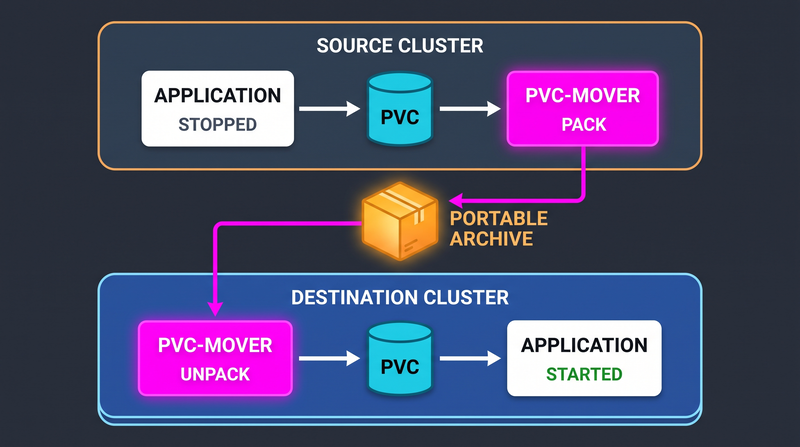
I call the helper pod pvc-mover. It has one temporary responsibility and
should disappear as soon as the migration is complete.
This works whether the application image is full-featured, minimal, distroless, or otherwise locked down. The migration tools live in the helper image, so the production image remains unchanged.
Stop the Writer First
A filesystem copy is not automatically an application-consistent backup. If the application is writing while files are packaged, related files may represent different points in time.
This matters for SQLite, embedded databases, indexes, and applications that maintain journal or metadata files. The safest general procedure is to stop the application before mounting its PVC through the helper pod.
For a GitOps-managed workload, set the replica count to zero in Git and let the
reconciler stop it. A manual kubectl scale may be reversed immediately when
automated self-healing is enabled.
Verify that no application pods remain before continuing:
kubectl -n <namespace> get deploy <application>
kubectl -n <namespace> get pods
If the workload cannot tolerate downtime, use an application-aware backup, replication, or a tested snapshot workflow instead. The helper-pod approach is best when a short maintenance window is acceptable.
Create the PVC Mover
The same pod can back up the source PVC and restore the destination PVC. Replace the namespace and claim name, then add any scheduling requirements used by the cluster.
apiVersion: v1
kind: Pod
metadata:
  name: pvc-mover
  namespace: <namespace>
spec:
  restartPolicy: Never
  containers:
    - name: mover
      image: alpine:3.22
      command:
        - sleep
        - "3600"
      volumeMounts:
        - name: data
          mountPath: /data
  volumes:
    - name: data
      persistentVolumeClaim:
        claimName: <pvc-name>
Apply it after the application releases the volume. This ordering also avoids
attachment conflicts when a ReadWriteOnce volume is still mounted on another
node.
kubectl apply -f pvc-mover.yml

kubectl -n <namespace> wait \
  --for=condition=Ready pod/pvc-mover \
  --timeout=90s
Back Up the Source PVC
Inspect the mounted volume before copying it. This confirms the actual files and gives you a quick view of the data size.
kubectl -n <namespace> exec pvc-mover -- ls -lah /data
kubectl -n <namespace> exec pvc-mover -- du -sh /data
For a lift-and-shift migration, packaging the complete volume is often safer than copying only the most obvious file. It preserves database journals, metadata, identity files, and related state stored beside the primary data.
kubectl -n <namespace> exec pvc-mover -- \
  tar czf /tmp/pvc-data.tar.gz -C /data .

kubectl -n <namespace> cp \
  pvc-mover:/tmp/pvc-data.tar.gz \
  ./pvc-data.tar.gz
Verify the archive before leaving the source cluster. A checksum provides a simple way to confirm that the same artifact reached the destination.
ls -lh ./pvc-data.tar.gz
sha256sum ./pvc-data.tar.gz
tar tzf ./pvc-data.tar.gz | head
Restore the Destination PVC
Create the destination PVC using a StorageClass supported by the destination cluster. StorageClass names and volume implementations are cluster-specific, so the source PVC manifest should be reviewed rather than copied blindly.
Keep the destination application stopped while the volume is populated. Apply
the same pvc-mover manifest in the destination cluster, this time pointing it
at the new claim.
kubectl -n <namespace> cp \
  ./pvc-data.tar.gz \
  pvc-mover:/tmp/pvc-data.tar.gz

kubectl -n <namespace> exec pvc-mover -- \
  sha256sum /tmp/pvc-data.tar.gz

kubectl -n <namespace> exec pvc-mover -- \
  tar xzf /tmp/pvc-data.tar.gz -C /data
The destination checksum should match the value recorded during backup. That confirms the archive survived the transfer, although an application-level integrity check is still valuable for database files.
Ownership Is Part of the Migration
The helper pod may create files as root, while the application runs with a
non-root UID and GID. A database can appear to restore successfully and then
fail on its first write because the ownership is wrong.
Determine the runtime identity used by the application and apply it to the restored data:
kubectl -n <namespace> exec pvc-mover -- \
  chown -R <uid>:<gid> /data

kubectl -n <namespace> exec pvc-mover -- \
  ls -lan /data
An fsGroup may help with volume permissions, but it should not replace
verification. Its behavior depends on the storage driver and the pod’s security
settings.
Cut Over and Clean Up
Delete the helper pod after the restoration is complete. It is temporary migration infrastructure and should not become a permanent administrative container.
kubectl -n <namespace> delete pod pvc-moverStart the destination application through its normal deployment process and
watch the rollout, logs, and health checks. Validate a real read and write
instead of treating a Running pod as proof of a successful migration.
Keep the source workload stopped during validation when the volume contains singleton identity, lease, or membership state. Running both copies at once could create duplicate identities or corrupt shared assumptions.
The PVC is only one part of the move. Secrets, ConfigMaps, workload identities, certificates, DNS records, network policies, and external dependencies still need their own migration plan.
A Note to My Future Self
This is not the most sophisticated Kubernetes backup or migration system, and it is not intended to be one. It is a small, practical pattern for the recurring situation where an application can be stopped, its PVC is manageable in size, and its data needs to move between clusters.
For large datasets, frequent migrations, or strict recovery objectives, native replication, application-aware backups, CSI snapshots, or resumable transfer tools are better choices. The helper pod is useful precisely because it solves the smaller problem without pretending to be a complete data platform.
The important part is not Alpine or the exact tar command. The reusable idea
is to separate the data operation from the application image, stop the writer,
verify the transfer, preserve ownership, and start the destination only after
the volume is ready.
I have now encountered this problem at a previous company, during a homelab rebuild, and again while migrating applications from EKS to GKE. That is enough repetition to justify leaving myself a runbook for the next time it appears.