GKE — Part 2: Private Nodes, Gateway API, and a More Realistic Cluster Shape
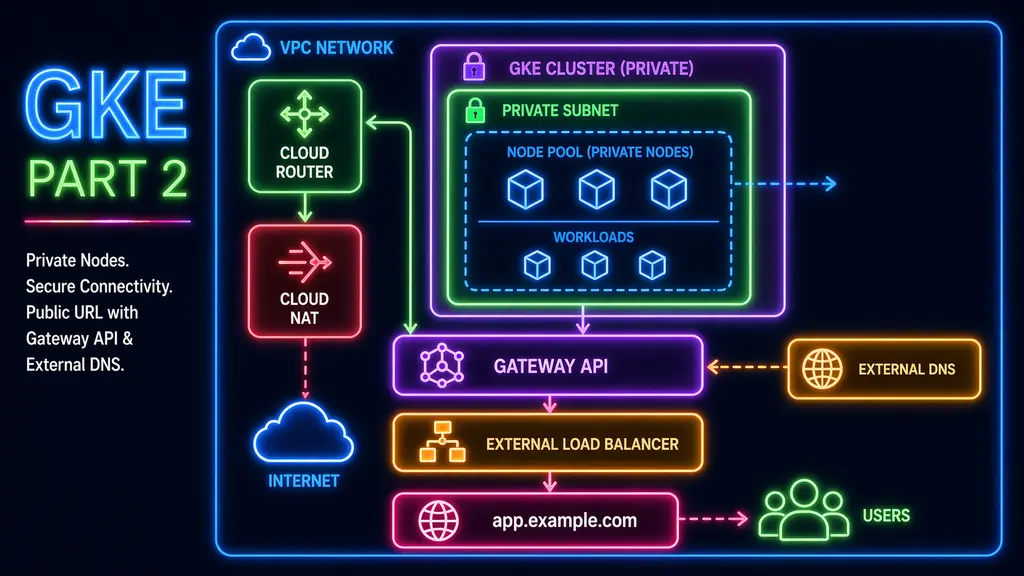
In the first part, the cluster was created and validated with a simple workload. It was enough to confirm that Terraform, networking, and GKE were wired together correctly.
That version worked, but it relied on a number of implicit assumptions. Nodes had public IPs, outbound access was automatic, and services could expose themselves directly. Those defaults make it easy to get started, but they also hide most of the decisions that matter later.
This is where the architecture started to prioritize isolation over convenience.
Moving to private nodes
The cluster was updated to use private nodes.
private_cluster_config {
  enable_private_nodes    = true
  enable_private_endpoint = false
  master_ipv4_cidr_block  = "172.16.0.0/28"
}
This change removes direct internet access from the nodes. As a result, anything that depends on outbound connectivity, such as pulling container images, now depends on the network being explicitly configured to allow it.
This is where the foundation layer needs to be extended.
Adding outbound connectivity
To support private nodes, outbound traffic is routed through Cloud Router and Cloud NAT.
resource "google_compute_router" "this" {
  name    = "dev-router"
  network = google_compute_network.this.id
  region  = var.region
}

resource "google_compute_router_nat" "this" {
  name                               = "dev-nat"
  router                             = google_compute_router.this.name
  region                             = var.region
  nat_ip_allocate_option             = "AUTO_ONLY"
  source_subnetwork_ip_ranges_to_nat = "ALL_SUBNETWORKS_ALL_IP_RANGES"
}
Without this, the cluster can still be created, but it will not behave as expected. Pods will fail to pull images and external calls will not succeed. With NAT in place, outbound traffic becomes a defined part of the environment instead of an implicit capability.
Recreating the cluster
Switching to private nodes required recreating the cluster. This is expected behavior and one of the reasons to keep the infrastructure defined in Terraform.
After the cluster was recreated, kubeconfig needed to be refreshed so that kubectl could connect to the new control plane endpoint. The node pool was then reconciled, and the cluster returned to a usable state.
Verifying through workload behavior
Rather than relying on node status alone, the environment was verified by deploying a simple workload again.
apiVersion: v1
kind: Namespace
metadata:
  name: janus-test
---
apiVersion: apps/v1
kind: Deployment
metadata:
  name: nginx
  namespace: janus-test
spec:
  replicas: 1
  selector:
    matchLabels:
      app: nginx
  template:
    metadata:
      labels:
        app: nginx
    spec:
      containers:
        - name: nginx
          image: nginx
          ports:
            - containerPort: 80
---
apiVersion: v1
kind: Service
metadata:
  name: nginx
  namespace: janus-test
spec:
  selector:
    app: nginx
  ports:
    - port: 80
      targetPort: 80
kubectl apply -f private-deploy.yaml
kubectl get pods -n janus-testWhen the pod reaches Running, it confirms that image pulls succeed and that outbound connectivity is working. This provides a more meaningful validation than checking node readiness alone.
Moving away from direct service exposure
In the first version, the application was exposed using a LoadBalancer service. While that approach is useful for initial validation, it does not provide a clear structure for managing traffic as the number of services increases.
Instead of introducing an ingress controller, Gateway API was enabled directly at the cluster level.
gateway_api_config {
  channel = "CHANNEL_STANDARD"
}
On GKE, this capability is built into the platform, which simplifies the setup compared to environments where additional controllers are required.
Defining a single entry point
With Gateway API enabled, traffic is routed through a defined entry point rather than exposing each service individually.
apiVersion: gateway.networking.k8s.io/v1
kind: Gateway
metadata:
  name: cluster-gateway
  namespace: janus-test
spec:
  gatewayClassName: gke-l7-global-external-managed
  listeners:
    - name: http
      protocol: HTTP
      port: 80
      hostname: "g.example.com"
---
apiVersion: gateway.networking.k8s.io/v1
kind: HTTPRoute
metadata:
  name: nginx-route
  namespace: janus-test
spec:
  parentRefs:
    - name: cluster-gateway
  hostnames:
    - "g.example.com"
  rules:
    - backendRefs:
        - name: nginx
          port: 80
Once the Gateway is provisioned, you can retrieve its external IP address:
kubectl get gateway cluster-gateway -n janus-test \
  -o jsonpath='{.status.addresses[0].value}'; echo
This returns the public IP assigned to the Gateway.
At this stage, before ExternalDNS is in place, you’ll need to create a DNS record manually. Point your chosen hostname (for example, app.yourdomain.com) to this IP using an A record.
This manual step is temporary—once ExternalDNS is configured, DNS records will be managed automatically.
Routing traffic through the Gateway
With DNS pointing to the Gateway, traffic can now be routed into the cluster:
curl http://g.example.comTraffic now enters the cluster through a defined edge rather than through a service-specific IP. This allows multiple services to share the same entry point in a structured way.
What changed
The first version of the cluster demonstrated that workloads could run.
This version defines how the environment is structured.
Nodes are private, outbound access is explicitly configured, and inbound traffic flows through a single entry point. The workload itself remains simple, but the system around it is no longer relying on default behavior.