Runbook: Bootstrap Argo CD on a New Cluster with GitOps
A portable runbook for bringing up a new Kubernetes cluster in which Argo CD manages itself and everything else from a Git control repo. It uses Sealed Secrets to keep secrets in Git. Ingress and SSO are optional add-ons; see the Reference section.
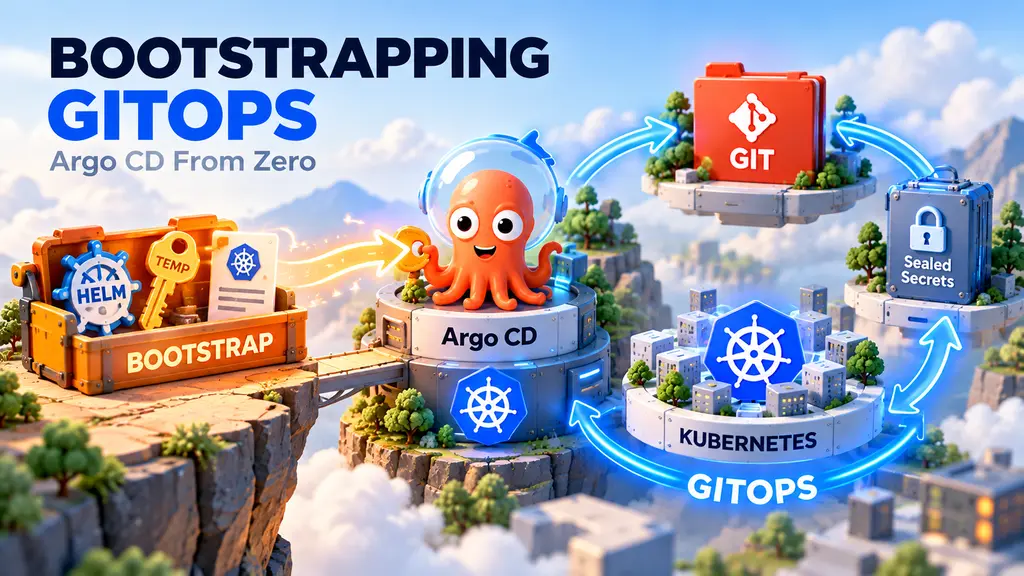
The bootstrap has a chicken-and-egg problem. Argo CD needs repo credentials, and later SSO secrets. Those live in Git as SealedSecrets, which need the sealed-secrets controller, which Argo CD itself installs. So the work goes in phases. Each phase is one change merged to the default branch, followed by a manual step.
Only Argo CD is installed manually with Helm. The temporary, read-only repo secret lets Argo CD read the private control repo and install Sealed Secrets. Installing the Sealed Secrets controller alone would not remove the credential bootstrap: avoiding the temporary secret would also require manually sealing and applying the permanent repo credential before Argo CD takes control.
Phase 1 (PR)  root app + Argo CD (minimal) + sealed-secrets
   manual     helm install Argo CD, temporary repo secret, apply root app, fetch sealing cert
Phase 2 (PR)  sealed repo creds (+ optional ingress / SSO)
   manual     delete temporary repo secret
Runbook metadata
| Item | Value |
|---|---|
| Scope | A new Kubernetes cluster with no existing Argo CD installation |
| Audience | Cluster and platform operators with cluster-admin access |
| Last reviewed | 29 September 2026 |
| Documented chart versions | argo-cd 10.2.1; sealed-secrets 2.18.6 |
| Change pattern | Two merge-and-sync cycles with manual steps between them |
| Expected duration | About 30–60 minutes, excluding code review, DNS and SSO |
| Operational impact | Installs controllers and CRDs in argocd and kube-system |
Run this against a non-production cluster first. Before using newer chart versions, render the charts and check their release notes for value or CRD changes.
Success criteria
The bootstrap is complete when:
bootstrap-argocd,platform,argocdandsealed-secretsreportSyncedandHealthy- the permanent
repo-credssecret exists and Argo CD can still read the control repo - the temporary
repo-creds-bootstrapsecret has been deleted - the sealed-secrets private key is backed up outside the cluster
Prerequisites
- A reachable Kubernetes cluster and a kubeconfig with cluster-admin access
- Helm 3,
kubectlandkubesealinstalled locally - A Git control repository and permission to merge the two bootstrap changes
- Read-only HTTPS credentials for every private repository Argo CD needs
- A secure vault or secret manager for the sealed-secrets private-key backup
- Optional: DNS, ingress-controller and identity-provider access for ingress or SSO
Confirm the target context before making changes:
kubectl config current-context
kubectl cluster-info
helm version
kubeseal --version
Placeholders
Replace these everywhere before you use a file.
| Placeholder | Meaning | Example |
|---|---|---|
<GIT_REPO_URL> | HTTPS URL of the control repo | https://git.example.com/org/gitops.git |
<GIT_CREDS_PREFIX> | URL prefix the repo credentials apply to (org or repo) | https://git.example.com/org |
<DEFAULT_BRANCH> | Branch the root app tracks | main |
<CLUSTER_PATH> | Folder for this cluster in the repo | clusters/prod |
<SEALING_CERT_PATH> | Local path where you save the sealed-secrets public cert | ~/sealing/<cluster>.crt |
<ARGOCD_FQDN> | Public or internal hostname of the Argo CD UI (only for ingress/SSO) | argocd.example.com |
The chart versions below are the documented baseline. Treat a version change as a separate, reviewed change.
Core concepts
- Control repo. The repo holds no application code. It defines which apps run in each cluster, at which version, from which repo, and how they are grouped (platform, tools, product).
- Cluster-first layout. Everything for one cluster lives under
<CLUSTER_PATH>/, and each cluster folder is self-contained. Never mix environments. - App-of-apps. A single root Application points at
root/bootstrap/. That folder holds AppProjects plus one “group” Application per folder (platform/, …). Each group Application recursively picks up every*application.yamlin its folder. - Wrapper charts. Each component is a small local Helm chart that lists the upstream chart as a dependency. Values sit under the dependency’s name, for example
argo-cd:. Extra manifests such as SealedSecrets go in the wrapper’stemplates/. - Projects restrict which source repos and destination namespaces each group may use.
- Rules. Don’t edit the cluster by hand, don’t bypass Argo CD, and never commit plaintext secrets. The only bootstrap exceptions are the manual Argo CD install, temporary repo secret and one-time root Application.
root Application (bootstrap-argocd)
  → root/bootstrap/projects/*   AppProjects
  → root/bootstrap/apps/*       group Applications (platform, ...)
      → <group>/**/application.yaml   component Applications
          → wrapper Helm chart (upstream dependency + templates/)
Folder tree
<CLUSTER_PATH>/
├── root/
│   ├── root-application.yaml             # applied once, by hand
│   └── bootstrap/
│       ├── projects/
│       │   └── platform-project.yaml
│       └── apps/
│           └── platform-application.yaml
└── platform/
    ├── argocd/
    │   ├── Chart.yaml
    │   ├── Chart.lock                    # commit for reproducible dependencies
    │   ├── application.yaml
    │   ├── values-bootstrap.yaml          # first helm install only; keep a copy for rebuilds
    │   ├── values.yaml                    # what Argo CD syncs to itself
    │   └── templates/                     # added in Phase 2
    │       ├── repo-creds.sealed-secret.yaml
    │       └── dex-<provider>-secret.sealed-secret.yaml   # optional, SSO
    └── sealed-secrets/
        ├── Chart.yaml
        ├── Chart.lock                    # commit for reproducible dependencies
        ├── application.yaml
        └── values.yaml
To add another group later (tools, product apps), add root/bootstrap/projects/<group>-project.yaml, root/bootstrap/apps/<group>-application.yaml and a <group>/ folder, all following the same pattern.
Phase 1: Install Argo CD and hand it control
Files for PR 1
<CLUSTER_PATH>/root/root-application.yaml
apiVersion: argoproj.io/v1alpha1
kind: Application
metadata:
  name: bootstrap-argocd
  namespace: argocd
spec:
  project: default
  destination:
    server: https://kubernetes.default.svc
    namespace: argocd
  source:
    repoURL: <GIT_REPO_URL>
    targetRevision: <DEFAULT_BRANCH>
    path: <CLUSTER_PATH>/root/bootstrap
    directory:
      recurse: true
  syncPolicy:
    automated:
      prune: true
      selfHeal: true
<CLUSTER_PATH>/root/bootstrap/projects/platform-project.yaml
apiVersion: argoproj.io/v1alpha1
kind: AppProject
metadata:
  name: platform
  namespace: argocd
spec:
  clusterResourceWhitelist:
    - group: '*'
      kind: '*'
  sourceRepos:
    - <GIT_REPO_URL>
    - https://argoproj.github.io/argo-helm
    - https://bitnami.github.io/sealed-secrets
    # add the Helm repos of other platform components here
  destinations:
    - namespace: argocd
      server: https://kubernetes.default.svc
    - namespace: kube-system
      server: https://kubernetes.default.svc
    # add a destination for each new platform namespace
<CLUSTER_PATH>/root/bootstrap/apps/platform-application.yaml
apiVersion: argoproj.io/v1alpha1
kind: Application
metadata:
  name: platform
  namespace: argocd
spec:
  project: platform
  destination:
    server: https://kubernetes.default.svc
    namespace: argocd
  source:
    repoURL: <GIT_REPO_URL>
    targetRevision: <DEFAULT_BRANCH>
    path: <CLUSTER_PATH>/platform
    directory:
      recurse: true
      include: "{*application.yaml,*application-set.yaml}"
  syncPolicy:
    automated:
      prune: true
      selfHeal: true
<CLUSTER_PATH>/platform/argocd/Chart.yaml
apiVersion: v2
name: argocd
version: 0.1.0
dependencies:
  - name: argo-cd
    version: 10.2.1
    repository: https://argoproj.github.io/argo-helm
<CLUSTER_PATH>/platform/argocd/application.yaml
The Application name argocd becomes the Helm release name. It must match the release name of the manual helm install, or Argo CD won’t adopt the release.
apiVersion: argoproj.io/v1alpha1
kind: Application
metadata:
  name: argocd
  namespace: argocd
spec:
  project: default
  source:
    repoURL: <GIT_REPO_URL>
    targetRevision: <DEFAULT_BRANCH>
    path: <CLUSTER_PATH>/platform/argocd
    helm:
      valueFiles:
        - values.yaml
  destination:
    server: https://kubernetes.default.svc
    namespace: argocd
  syncPolicy:
    automated:
      prune: true
      selfHeal: true
<CLUSTER_PATH>/platform/argocd/values-bootstrap.yaml
This file has no dex, no ingress and no SealedSecrets, so nothing in it depends on components Argo CD hasn’t installed yet.
# Used only for the initial `helm install`. Access via `kubectl port-forward`.
argo-cd:
  configs:
    params:
      server.insecure: true   # TLS is terminated at the ingress, if there is one

  controller:
    replicas: 1

  repoServer:
    replicas: 1

  applicationSet:
    replicaCount: 1

  redis:
    enabled: true

  dex:
    enabled: false
<CLUSTER_PATH>/platform/argocd/values.yaml
Start this file with the same content as values-bootstrap.yaml, so the first self-sync changes nothing. From Phase 2 onward, this is the file you evolve.
Do not add templates/ yet. If SealedSecret manifests sync before the SealedSecret CRD exists, the argocd app fails.
<CLUSTER_PATH>/platform/sealed-secrets/Chart.yaml
apiVersion: v2
name: sealed-secrets
version: 0.1.0
dependencies:
  - name: sealed-secrets
    version: 2.18.6
    repository: https://bitnami.github.io/sealed-secrets
<CLUSTER_PATH>/platform/sealed-secrets/application.yaml
The Application name sealed-secrets gives the controller Service name sealed-secrets in kube-system. kubeseal needs that name below.
apiVersion: argoproj.io/v1alpha1
kind: Application
metadata:
  name: sealed-secrets
  namespace: argocd
spec:
  project: platform
  source:
    repoURL: <GIT_REPO_URL>
    targetRevision: <DEFAULT_BRANCH>
    path: <CLUSTER_PATH>/platform/sealed-secrets
    helm:
      valueFiles:
        - values.yaml
  destination:
    server: https://kubernetes.default.svc
    namespace: kube-system
  syncPolicy:
    automated:
      prune: true
      selfHeal: true
<CLUSTER_PATH>/platform/sealed-secrets/values.yaml
sealed-secrets:
  podSecurityContext:
    enabled: true
    fsGroup: 65534

  containerSecurityContext:
    enabled: true
    readOnlyRootFilesystem: true
    runAsNonRoot: true
    runAsUser: 1001
Before you open the PR, resolve and render both dependencies. Commit each generated Chart.lock file so later builds use the same dependency versions; do not commit the generated charts/ directories.
helm dependency update <CLUSTER_PATH>/platform/argocd
helm template argocd <CLUSTER_PATH>/platform/argocd \
  -n argocd -f <CLUSTER_PATH>/platform/argocd/values.yaml

helm dependency update <CLUSTER_PATH>/platform/sealed-secrets
helm template sealed-secrets <CLUSTER_PATH>/platform/sealed-secrets \
  -n kube-system -f <CLUSTER_PATH>/platform/sealed-secrets/values.yaml

rm -rf \
  <CLUSTER_PATH>/platform/argocd/charts \
  <CLUSTER_PATH>/platform/sealed-secrets/charts
Manual step A: install and hand over (after PR 1 is merged)
1. Install Argo CD from the wrapper chart, not the upstream argo/argo-cd. The values are nested under argo-cd:, and the upstream chart would silently ignore them.
helm dependency build <CLUSTER_PATH>/platform/argocd

helm install argocd <CLUSTER_PATH>/platform/argocd \
  -n argocd --create-namespace \
  -f <CLUSTER_PATH>/platform/argocd/values-bootstrap.yaml

rm -rf <CLUSTER_PATH>/platform/argocd/charts
2. Create temporary repo credentials. Use HTTPS so the secret matches the repoURLs. A repo-creds secret applies to every repo under <GIT_CREDS_PREFIX>.
kubectl -n argocd create secret generic repo-creds-bootstrap \
  --from-literal=type=git \
  --from-literal=url=<GIT_CREDS_PREFIX> \
  --from-literal=username=<username> \
  --from-literal=password=<token>

kubectl -n argocd label secret repo-creds-bootstrap \
  argocd.argoproj.io/secret-type=repo-creds
Use a read-only token. For GitHub, use username=x-access-token with a PAT, or see GitHub App repo credentials.
3. Apply the root app. This is the only manual kubectl apply.
kubectl apply -f <CLUSTER_PATH>/root/root-application.yaml4. Verify.
kubectl -n argocd get applications     # bootstrap-argocd, platform, argocd, sealed-secrets: Synced/Healthy
kubectl -n argocd get secret argocd-initial-admin-secret -o jsonpath='{.data.password}' | base64 -d
kubectl -n argocd port-forward svc/argocd-server 8080:80   # http://localhost:8080, user admin
5. Fetch the sealing cert and back up the private key.
kubeseal --controller-name sealed-secrets --controller-namespace kube-system \
  --fetch-cert > <SEALING_CERT_PATH>

# Store this output in a vault. If the key is lost, every SealedSecret must be re-sealed.
kubectl -n kube-system get secret -l sealedsecrets.bitnami.com/sealed-secrets-key -o yaml
6. Seal the permanent repo credentials (and any SSO secret from the Reference section). The default scope is strict, so each secret’s name and namespace must match exactly.
kubectl create secret generic repo-creds -n argocd \
  --from-literal=type=git \
  --from-literal=url=<GIT_CREDS_PREFIX> \
  --from-literal=username=<username> \
  --from-literal=password=<token> \
  --dry-run=client -o yaml \
| kubectl label --local -f - argocd.argoproj.io/secret-type=repo-creds -o yaml \
| kubeseal --cert <SEALING_CERT_PATH> --format yaml \
  > <CLUSTER_PATH>/platform/argocd/templates/repo-creds.sealed-secret.yaml
Check that the file decrypts on the cluster:
kubeseal --controller-name sealed-secrets --controller-namespace kube-system \
  --validate < <CLUSTER_PATH>/platform/argocd/templates/repo-creds.sealed-secret.yaml
Phase 2: Permanent repo credentials
Files for PR 2
<CLUSTER_PATH>/platform/argocd/templates/repo-creds.sealed-secret.yaml: generated by kubeseal. It has this shape:
---
apiVersion: bitnami.com/v1alpha1
kind: SealedSecret
metadata:
  creationTimestamp: null
  name: repo-creds
  namespace: argocd
spec:
  encryptedData:
    password: <ENCRYPTED>
    type: <ENCRYPTED>
    url: <ENCRYPTED>
    username: <ENCRYPTED>
  template:
    metadata:
      creationTimestamp: null
      labels:
        argocd.argoproj.io/secret-type: repo-creds
      name: repo-creds
      namespace: argocd
Optionally add the ingress and SSO pieces to values.yaml in the same PR.
Manual step B: after PR 2 syncs
kubectl -n argocd get secret repo-creds        # unsealed
kubectl -n argocd get applications             # still Synced, so repo access works
kubectl -n argocd delete secret repo-creds-bootstrap
kubectl -n argocd get applications             # still Synced after the delete
Reference: optional add-ons
GitHub App repo credentials
GitHub App credentials are an alternative to a user token: they’re scoped to the org, rotate automatically and aren’t tied to a person. Use these keys in place of username/password, in both the temporary secret and the sealed one:
  --from-literal=githubAppID=<app-id> \
  --from-literal=githubAppInstallationID=<installation-id> \
  --from-file=githubAppPrivateKey=<path-to-app-key.pem>
Set url to the org, for example https://github.com/<org>. Give the app read-only Contents and Metadata permissions on the repos Argo CD needs.
Ingress
Add this under argo-cd.server in values.yaml, and set the global domain. Pick any ingress controller. If cert-manager issues the TLS cert, add its issuer annotation.
argo-cd:
  global:
    domain: <ARGOCD_FQDN>

  server:
    ingress:
      enabled: true
      ingressClassName: <INGRESS_CLASS>
      hostname: <ARGOCD_FQDN>
      tls: true
      # annotations:
      #   cert-manager.io/cluster-issuer: <ISSUER>
Without an ingress, keep using kubectl port-forward svc/argocd-server 8080:80.
SSO with dex
SSO needs a reachable https://<ARGOCD_FQDN> because the identity provider redirects back to it. Set it up after the ingress works. Both options below follow the same pattern:
- Register an OAuth app with the provider, using the callback URL
https://<ARGOCD_FQDN>/api/dex/callback. - Seal its client secret as
dex-<provider>-secretinargocd, with the labelapp.kubernetes.io/part-of: argocd. Argo CD only resolves$secret:keyreferences from secrets that carry that label. - Add the
cm,rbacanddexblocks tovalues.yaml.
Seal the client secret:
kubectl create secret generic dex-<provider>-secret -n argocd \
  --from-literal=clientSecret=<client-secret> --dry-run=client -o yaml \
| kubectl label --local -f - app.kubernetes.io/part-of=argocd -o yaml \
| kubeseal --cert <SEALING_CERT_PATH> --format yaml \
  > <CLUSTER_PATH>/platform/argocd/templates/dex-<provider>-secret.sealed-secret.yaml
The sealed file has this shape:
---
apiVersion: bitnami.com/v1alpha1
kind: SealedSecret
metadata:
  creationTimestamp: null
  name: dex-<provider>-secret
  namespace: argocd
spec:
  encryptedData:
    clientSecret: <ENCRYPTED>
  template:
    metadata:
      creationTimestamp: null
      labels:
        app.kubernetes.io/part-of: argocd
      name: dex-<provider>-secret
      namespace: argocd
    type: Opaque
Option A: Google
Create an OAuth client (type “Web application”) in the Google Cloud console and add the callback URL as an authorized redirect URI. Google’s connector doesn’t return groups without extra setup, so the RBAC below maps individual emails.
argo-cd:
  configs:
    cm:
      url: https://<ARGOCD_FQDN>
      dex.config: |
        connectors:
          - type: google
            id: google
            name: Google
            config:
              clientID: <GOOGLE_CLIENT_ID>
              clientSecret: $dex-google-secret:clientSecret
              redirectURI: https://<ARGOCD_FQDN>/api/dex/callback
              # hostedDomains:
              #   - <EMAIL_DOMAIN>     # only allow accounts from your domain

    rbac:
      policy.default: role:readonly
      scopes: '[groups, email]'
      policy.csv: |
        g, <ADMIN_EMAIL_1>, role:admin
        g, <ADMIN_EMAIL_2>, role:admin

  dex:
    enabled: true
Option B: GitHub
Create an OAuth App under the org’s settings (Developer settings → OAuth Apps) and set the callback URL. GitHub teams arrive as groups in the form <org>:<team-slug>, so RBAC can map whole teams.
argo-cd:
  configs:
    cm:
      url: https://<ARGOCD_FQDN>
      dex.config: |
        connectors:
          - type: github
            id: github
            name: GitHub
            config:
              clientID: <GITHUB_CLIENT_ID>
              clientSecret: $dex-github-secret:clientSecret
              redirectURI: https://<ARGOCD_FQDN>/api/dex/callback
              orgs:
                - name: <GITHUB_ORG>
                  # teams:            # optional: only members of these teams can log in
                  #   - <TEAM_SLUG>
              teamNameField: slug

    rbac:
      policy.default: role:readonly
      scopes: '[groups]'
      policy.csv: |
        g, <GITHUB_ORG>:<ADMIN_TEAM_SLUG>, role:admin

  dex:
    enabled: true
After SSO works
- Log in through SSO and confirm that admins get
role:admin. - Optional hardening: turn off the built-in admin account, and delete the initial admin secret.
argo-cd:
  configs:
    cm:
      admin.enabled: false
kubectl -n argocd delete secret argocd-initial-admin-secret
Adding things later
- Platform component: add
<CLUSTER_PATH>/platform/<component>/{Chart.yaml,values.yaml,application.yaml}. Add its Helm repo tosourceReposinplatform-project.yaml, and its namespace todestinations. - New group: add a project, a group Application under
root/bootstrap/, and a folder with components. - Secrets: seal them against
<SEALING_CERT_PATH>, put them in the component’stemplates/, and validate them withkubeseal --validatebefore merging. If a component’s chart installs CRDs that its own templates use, expect a retry or two on the first sync.
Troubleshooting
Argo CD cannot read the control repo
Check that the temporary secret is in argocd, has the argocd.argoproj.io/secret-type=repo-creds label and uses an HTTPS URL prefix that matches every repoURL.
kubectl -n argocd get secret repo-creds-bootstrap --show-labels
kubectl -n argocd logs deployment/argocd-repo-server --tail=100
Do not delete the temporary secret until the sealed repo-creds secret exists and the Applications remain synced.
An Application reports that its project does not exist
The project and child Applications are discovered during the same recursive sync. Refresh the root Application after the platform AppProject exists. If this repeats, add Argo CD sync waves so projects are created before Applications.
A SealedSecret is rejected
Confirm that the CRD and controller are ready, then validate the file against the target cluster. A secret sealed for another cluster, name or namespace will not decrypt when strict scope is used.
kubectl get crd sealedsecrets.bitnami.com
kubectl -n kube-system rollout status deployment/sealed-secrets
kubeseal --controller-name sealed-secrets --controller-namespace kube-system \
  --validate < <CLUSTER_PATH>/platform/argocd/templates/repo-creds.sealed-secret.yaml
Argo CD does not adopt the Helm release
The manual install and the Argo CD Application must both use the release name argocd, namespace argocd and the same wrapper chart. Fix any mismatch before enabling self-management.
Resetting a failed bootstrap
Prefer correcting Git and allowing Argo CD to reconcile. Use a full reset only on a new, otherwise empty cluster.
If sealed-secrets has generated a private key, back it up before removing anything. Argo CD installed Sealed Secrets, so it is not a Helm release and helm uninstall sealed-secrets must not be used.
Delete the parent Applications first so they cannot recreate the child Applications, and remove Argo CD’s self-management Application so it cannot heal the Helm release during removal. Then let Argo CD cascade-delete the Sealed Secrets resources while the Argo CD controller is still running. Finally, uninstall the only manually installed Helm release:
kubectl -n argocd delete application bootstrap-argocd platform argocd --ignore-not-found

if kubectl -n argocd get application sealed-secrets >/dev/null 2>&1; then
  kubectl -n argocd patch application sealed-secrets --type merge \
    -p '{"metadata":{"finalizers":["resources-finalizer.argocd.argoproj.io"]}}'
  kubectl -n argocd delete application sealed-secrets --wait=false
  kubectl -n argocd wait --for=delete application/sealed-secrets --timeout=2m
fi

helm uninstall argocd -n argocd || true
kubectl delete namespace argocd --ignore-not-found
Review any remaining cluster-scoped resources before retrying:
kubectl get crd | grep -E 'argoproj|sealedsecrets'
kubectl get clusterrole,clusterrolebinding | grep -E 'argocd|sealed-secrets'
Do not delete CRDs blindly: doing so can delete their custom resources. Remove them only when the cluster is dedicated to this failed bootstrap and you have confirmed nothing else uses them.
Rebuilding the cluster (disaster recovery)
- Restore the sealed-secrets key into
kube-systembefore you apply the root app, so the existing SealedSecrets still decrypt. - Rerun Phase 1, manual step A (steps 1–4). You still need the temporary repo secret, because Argo CD can’t pull a private repo until sealed-secrets has synced and unsealed
repo-creds. Delete the temporary secret once it has. - Skip the sealing steps: because the key was restored, the SealedSecrets already in Git decrypt as-is.