Janus Scan: Freeing My Ten-Year-Old Scanner from Windows
I bought a Brother ADS-1000W more than ten years ago. It’s a small sheet-fed scanner: drop in a stack of paper, press a button, and it pulls the pages through and scans both sides at once. It has worked well the whole time.
The hardware was never the problem. Everything around it was.
The annual chore
The scanner lived on Windows, and I don’t use Windows anymore. So once or twice a year, when a pile of paper needed scanning, I dug out the old laptop and relearned Brother’s app. Where is the duplex setting again? Why did it save a JPG when I wanted a PDF? Every time, the same chore.
That laptop came with Windows 7, and when it was forced up to Windows 10, I held my breath. The Brother software survived the upgrade. But that’s luck, not a plan. One day an update will break it, and I’ll be reinstalling Windows 7 or 10 just to scan a few receipts.
Linux almost worked
Brother does publish Linux drivers, so I tried the native route with XSane. It scanned, but I’m not a fan of the interface. It lacked a straightforward way to do the two things I want every time: pick JPG or PDF, and pick one side or both.
Two other things I never solved:
- Multi-page batches. The feeder holds a limited stack. I wanted the app to pause when the feeder runs empty and ask whether I have more pages, then keep adding to the same document. I couldn’t make XSane do that, and I’m still not sure it can.

- Wi-Fi. The scanner has Wi-Fi, but I never got wireless scanning to work on Linux, so I never found out whether it was possible.
Vibe coding, with my eyes open
I wanted an excuse to hop on the Rust train anyway. So one weekend, I built my own scanning app, with an AI coding assistant writing most of the code.
Call it vibe coding, but I didn’t just wait for the result. I watched it being built, asked why it did things one way and not another, and tested every step on the real scanner. I also asked for every build to be tested in Docker: Ubuntu 24.04, Linux Mint 22 and CachyOS, plus one container that does a real scan over Wi-Fi. I learned more about scanners, drivers and Linux packaging in that one weekend than in ten years of owning the thing. That habit of watching paid off later, in a way I didn’t expect.
It’s called Janus Scan. Naming it after myself felt a little vain, until I remembered the other Janus: the Roman god with two faces, one looking forward and one looking back. For a scanner that reads both sides of every sheet, that’s too good to pass up. So the name stayed, and the logo became his two faces, back to back.
The code is on GitHub: januschung/janus-scan. It’s MIT licensed.
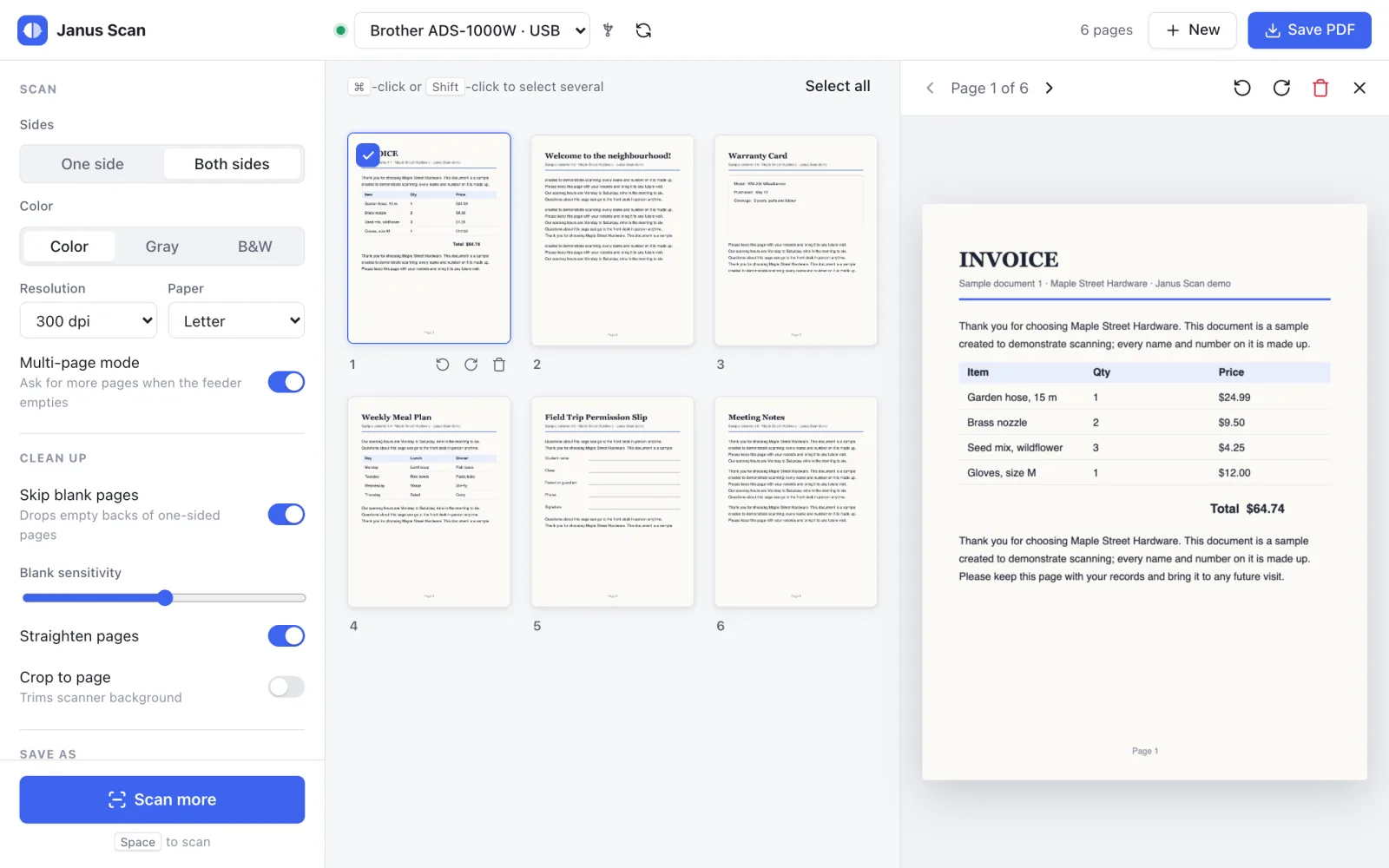
Here’s the desktop app doing a typical run: both sides at once with the blank backs skipped, a second batch after the feeder runs empty, an upside-down page fixed, pages dragged into order, and the PDF saved to a folder on my NAS.
Everything I want is on one screen:
- One side or both sides, color, gray or black and white, resolution and paper size
- Multi-page mode, which does exactly what I couldn’t get XSane to do: when the feeder runs empty, it asks whether there are more pages and adds them to the same document
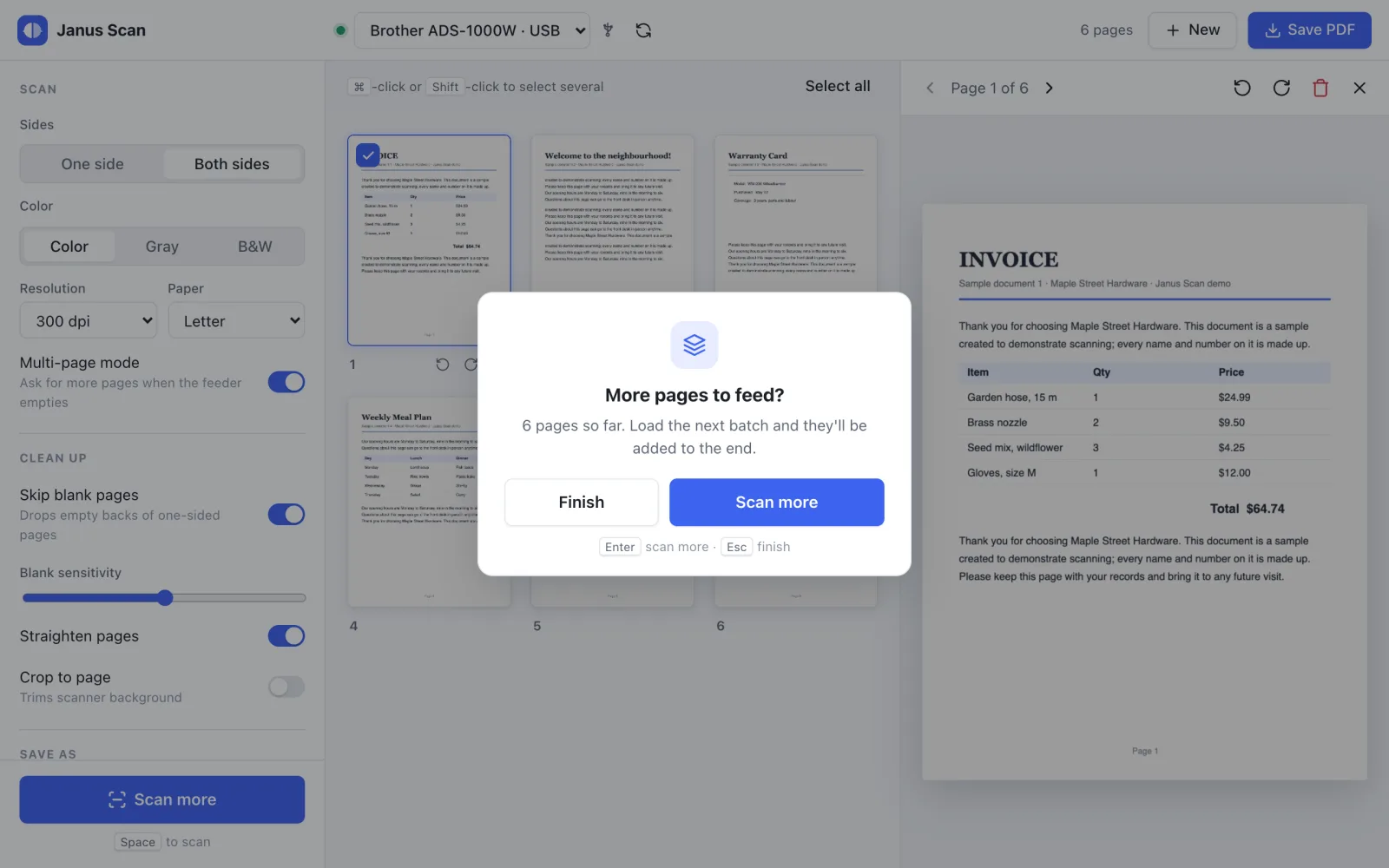
- Live thumbnails as pages come in, and a large preview of any page
- Page clean-up: reorder by dragging, rotate any page on its own, remove pages (one, several or all), skip blank backs of one-sided pages, and straighten crooked ones
- Save as PDF, JPEG, PNG or TIFF, never overwriting an existing file
- A file name preset, like Brother’s app has. Set it once with any text plus
{date},{time}and a counter{n}:Receipts {date} {n}becomesReceipts 2026-10-17 001.pdf, then002, and so on. The default isScan {date} {time}. - USB and Wi-Fi on both macOS and Linux
- Light and dark mode, plus keyboard shortcuts: Space scans, Enter means “more pages”, Esc means “finish”
It’s small, too. The app uses the system’s own web view instead of bundling a browser, so the macOS disk image and the Linux .deb are each under 3 MB.
The Android wall
Once the desktop app worked, the next annoyance was obvious: the scanner sits in one corner of the house, and my laptop usually doesn’t. What I really wanted was to load the feeder, tap a button on my phone, and have the PDF land on my NAS.
So I asked the obvious question: can it run on Android too?
The screens would have been easy, since Tauri builds Android apps as well. Scanning was another story. The desktop app talks to the scanner through the system’s scanning layer: Apple’s ImageCaptureCore on the Mac, SANE on Linux, each with Brother’s driver underneath. Android has neither, and Brother has no Android driver for other apps to use. Plenty of newer scanners skip drivers altogether with driverless scanning (AirScan), so we checked the scanner for that. It answered “not found”. It only speaks Brother’s own protocol, on its own network port.
That left one route: reverse-engineer Brother’s protocol and write a driver from scratch, for one discontinued scanner. The whole app had taken a weekend; cracking the protocol alone could take months. I parked Android under “later, not committed”, which usually means never.
The answer was in the test logs
The way out was already running on my laptop.
Remember those Docker containers testing the Linux build? One of them scanned over Wi-Fi on every run. A small Linux box, with no screen and nobody at the keyboard, driving my scanner across the network without complaint.
That changed the question. My phone doesn’t need a driver if something else on the network has one. Put Brother’s Linux driver in a tiny Debian container next to the scanner, give it a web page, and every phone in the house can scan without installing anything. The scan can go straight to the NAS or back to whoever asked for it.
No reverse engineering, no Android app, and the problem that had no driver just went away. I wouldn’t have seen that if I had only waited for the finished app instead of watching how it was tested.
Janus Scan Server
So Janus Scan got a second half: Janus Scan Server. It’s a small container that sits on the network next to the scanner and talks to it over Wi-Fi. Any phone, tablet or computer scans by opening a web page. There’s nothing to install on the phone, and no Brother driver on any device but the server.

The web page is the same Svelte UI as the desktop app, built a second time and reshaped for small screens: a big Scan button, two columns of pages, settings in a bottom sheet, and pages that open full screen when you tap them. Reordering is long-press and drag, since phones don’t do the mouse-style drag and drop the desktop uses.
The bonus I didn’t plan for: I set out to fix Android and fixed everything else along the way. An iPhone works the same way, and so does an iPad, a Chromebook, or a laptop I never installed the desktop app on. The web page is just one client of a plain HTTP API, so anything in the house that can make a web request can start a scan, check the pages and save the result. A script, a home automation button, whatever comes next.
A few more things I like about how it turned out:
- One document, every device. Everyone sees the same pages, live. I can start a batch from my phone and finish it at my desk.
- NAS folders with their own names. A small config file maps names like “Receipts” or “Taxes 2026” to folders on the NAS, each with its own file name preset. The page only ever shows the names.
- It installs like an app. Over HTTPS, “Add to Home screen” gives it an icon that opens full screen, no app store involved.
- It cleans up after itself. Scans can be sensitive, so unsaved pages disappear after an hour without activity, and everything goes when the server stops.
I run it on my homelab k3s cluster, behind Traefik with the same *.c.home certificate my other apps use. It also comes with a Docker Compose file and LXC install files for Proxmox, so it runs wherever your homelab does. The container image is 31 MB.
How it fits together
The core is Rust. On top sits a desktop UI built with Tauri and Svelte. Underneath, each system talks to the scanner its own way:
- macOS: Apple’s ImageCaptureCore, with Brother’s Mac driver
- Linux and the server: SANE, with Brother’s
brscan4driver
The rest of the app doesn’t care which one is in use. The server is one more Rust crate on top of the same scanning, image and PDF code, and a small command-line tool shares it too.
On real hardware, the desktop app scans over both USB and Wi-Fi on my Linux Mint and Linux Lite machines, on top of the Docker test runs. There’s also an install script: one command builds the app and installs it, into Applications on a Mac or the app menu on Linux.
Things I learned along the way
Wi-Fi on Linux works. Brother’s Linux driver just needs to be told the scanner’s IP address once. Then it scans over Wi-Fi like any other scanner.
Wi-Fi on the Mac is slow, and it’s not the Wi-Fi. I timed the same kind of scan, both sides, color, 300 dpi:
| Setup | Time per page side |
|---|---|
| Mac over USB | 2.0 s |
| Mac over Wi-Fi | 10.1 s |
| Linux over the same Wi-Fi | 3.2 s |
| Janus Scan Server over the same Wi-Fi | 2.2 s |
My first guess was that the network was the bottleneck. The Linux numbers proved me wrong. Brother’s Mac driver is simply slow over the network. Over Wi-Fi, the server is now as quick as the Mac over a cable.
You don’t need Windows to set up Wi-Fi. The worst part of owning this scanner was that putting it on Wi-Fi seemed to require Brother’s Windows tool. It turns out the scanner has a built-in web page where you can change its network name and password from any browser, as long as it’s already on a network. I wrote that up in the project’s Wi-Fi guide.
Brother’s driver crashes in a slim container, for a silly reason. The first time the server tried to open the scanner, it segfaulted. Plain scanimage crashed too, and the exact same driver worked fine in my bigger test image. After a lot of comparing, the culprit was a missing netbase package: the tiny one that provides /etc/services. Every desktop Linux has it, so Brother never noticed. One line in the Dockerfile fixed it.
An empty feeder looks like a broken connection. Over Wi-Fi, when you start a scan with no paper loaded, Brother’s driver starts happily and then reports an I/O error on the first read. The app used to say “the scanner was disconnected”, which sent me looking for network problems. Now it says the scanner didn’t start, and to check the paper.
The container didn’t need most of SANE. Debian’s SANE package drags in about 300 MB of support for cameras, PDFs and every other scanner. Brother’s driver can stand in for SANE’s front end on its own, so the server loads it directly. That’s how the image got down to 31 MB.
Goodbye, last Windows machine
The old laptop has one job left, and Janus Scan just took it over. It was my last Windows machine, and it can finally retire from scanning duty. I’ll repurpose it with Linux, or maybe use it as an excuse to try out BSD.
What’s next
Nothing, really, and that’s the point. I had wanted the scanner’s own Scan button to work on Linux, but Brother doesn’t publish its “scan key” tool for this model, and scanning from my phone covers it anyway. Press the button on the scanner and it beeps three times at you; tap Scan on the phone instead.
A note if you try it on a Mac: I’m not paying Apple for a developer ID, so the app isn’t signed. macOS asks you to approve it once under Privacy & Security, or you can build it yourself.
Janus Scan is built and tested on exactly one scanner, the ADS-1000W, because that’s the one I own. Nothing in the code is tied to it, though, so other scanners may well work. If you get it running on yours, contributions are welcome, and if you have a scanner you’d like supported and can donate or lend one, open an issue on GitHub. And if you have an ADS-1000W sitting in a drawer because the software got painful, it might be time to dust it off.