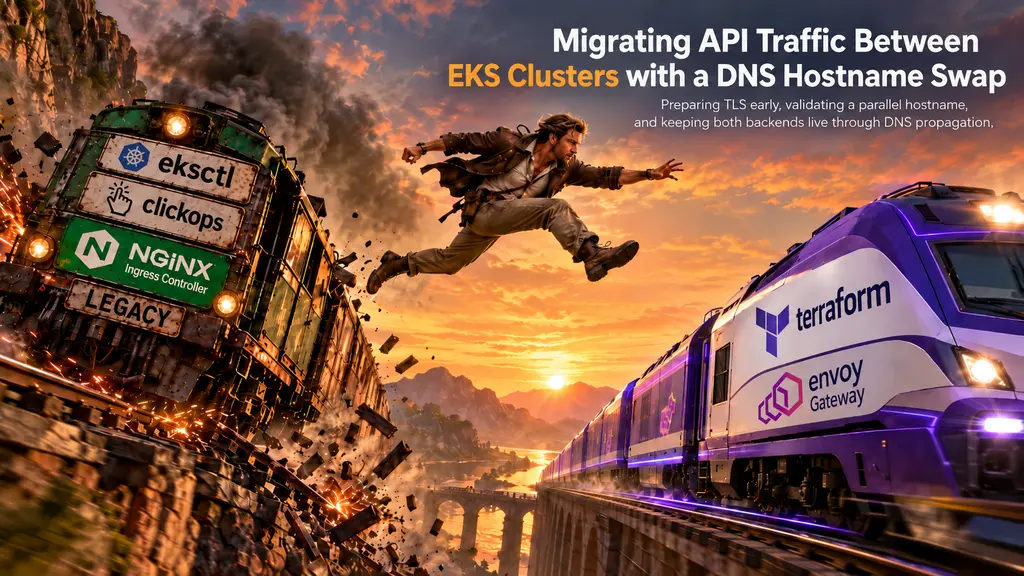
Migrating API Traffic Between EKS Clusters with a DNS Hostname Swap
Moving an application between Kubernetes clusters is usually easier than moving its traffic.
The workloads can run in both places and pass health checks in both places. The hard moment is changing the public hostname without handing clients a bad certificate, an unreachable load balancer, or a dead endpoint while DNS caches catch up.
During our EKS migration we moved API traffic from a legacy cluster running NGINX Ingress to a new cluster running Envoy Gateway, one environment at a time: dev, then staging, then production. This post covers the pattern we used and how it tightened from one environment to the next.
Two Edges, No Shared Front Door
The two clusters shared nothing at the edge. Each had its own load balancer, ingress layer, pods, and ExternalDNS installation, and there was no layer in front of both where traffic could shift gradually. The cutover had to move the public hostname from one stack to the other in a single DNS change.
That set one rule for every environment: the old path stays up when DNS changes.
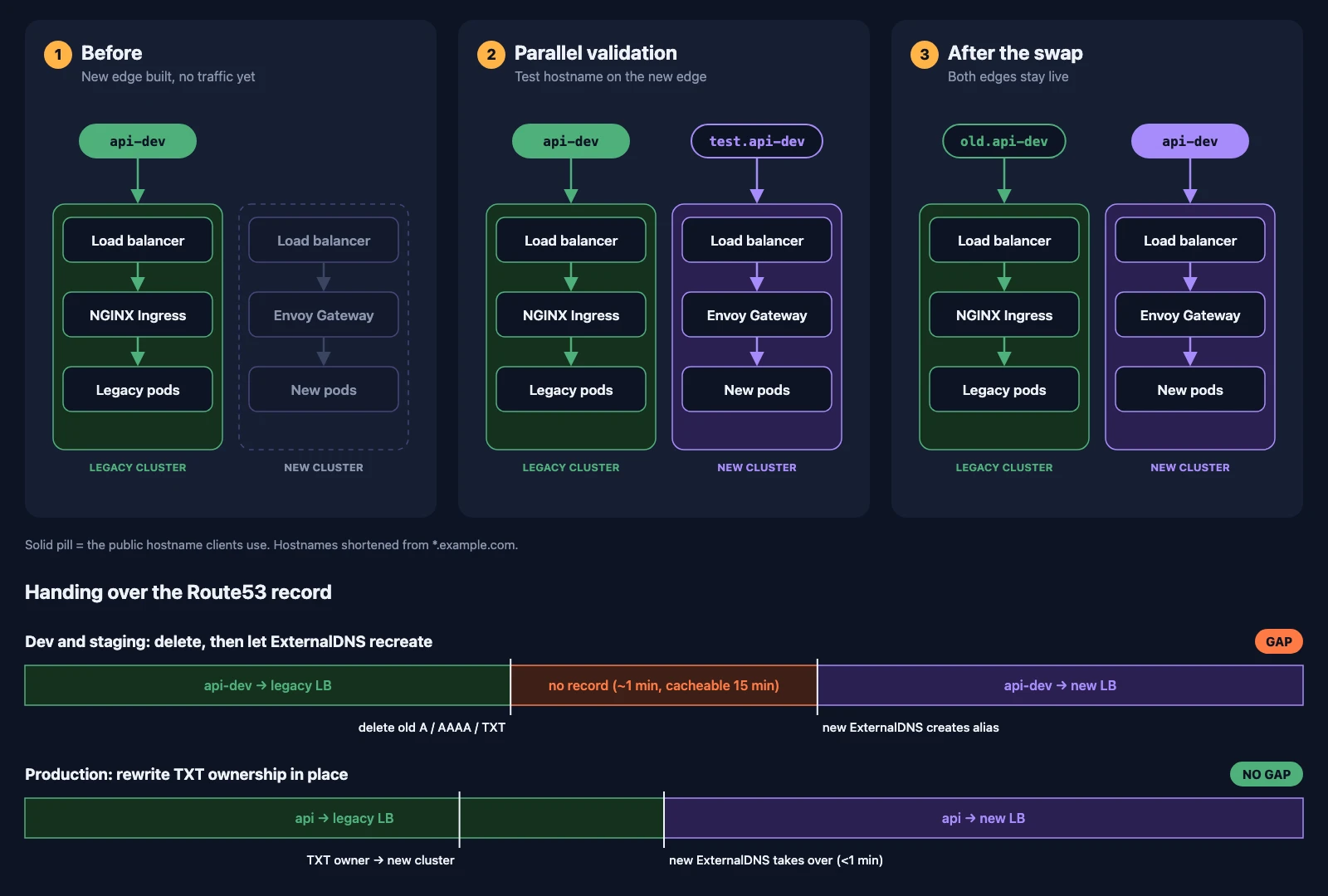
The plan had four parts:
- build the new edge before it gets any traffic
- issue certificates before the cutover
- test the new edge through a parallel hostname
- swap hostnames and hand over the DNS record, with both stacks still running
Build the New Edge First
Everything that would serve the public API was running on the new cluster before the hostname moved:
- an internet-facing AWS load balancer
- an Envoy Gateway
Gateway - the application
HTTPRoute - healthy backend pods and Services
- ExternalDNS pointed at the Route53 zone
- a valid TLS certificate
None of this needed the real hostname to point at the new load balancer. A DNS change should expose a path that already works, not kick off the work of building it.
Issue Certificates Before the Cutover
cert-manager with the Route53 DNS-01 challenge took TLS off the critical path.
HTTP-01 would need the certificate authority to reach a token through the hostname being validated, and that hostname still points at the old cluster. DNS-01 proves control with a temporary TXT record instead, so the new cluster could hold a valid certificate for api-dev.example.com while real traffic was still flowing to the legacy one.
A pre-issued certificate doesn’t prove the whole request path works, but it means the cutover never waits on issuance and never serves broken TLS.
Test Through a Parallel Hostname
In dev, the new cluster first came up on a hostname only it routed:
api-dev.example.com       -> legacy LB -> NGINX Ingress -> legacy pods
test.api-dev.example.com  -> new LB    -> Envoy Gateway -> new pods
Same application version, two independent paths. Existing clients kept using api-dev.example.com while we tested DNS resolution, TLS, routing, responses, and observability through test.api-dev.
Curling the new load balancer with a custom Host header gets you part of the way. A real hostname exercises public DNS and the certificate the way an actual client will.
Staging went straight to the swap, since dev had already proven the Envoy Gateway path. Production went back to the full sequence: the new cluster came up on a temporary new.api.example.com, and once that checked out, its HTTPRoute also started answering for api.example.com, ahead of any DNS change.
Swap the Hostnames
The swap itself is one change across both clusters:
- the new cluster serves
api-dev.example.com - the legacy cluster moves to
old.api-dev.example.com
The legacy stack stays up, reachable directly at old.api-dev, as a known-good path to compare against and fall back to.
That changes what each cluster wants. Moving the actual Route53 record is a separate step, covered in the ownership section below.
Why Keeping Both Stacks Alive Matters
A DNS update isn’t a global switch. Some clients pick up the new answer right away, and others hold a cached one for a while. With both stacks running, either answer is correct:
Client with old cached answer -> legacy load balancer -> live legacy pods
Client with new answer        -> new load balancer    -> live new pods
Propagation spreads traffic across two working paths instead of sending some clients into a dead end.
TTLs turn out to be the easy part. ExternalDNS writes Route53 alias records for AWS load balancers, and alias records use the target’s TTL (60 seconds for ELB), so there’s nothing to lower ahead of time. The long tail comes from elsewhere:
- resolvers and clients that cache past the TTL
- keep-alive and streaming connections that stay pinned to one load balancer
- DNS changes, which don’t drain anything
Keeping the old stack running past that tail covers all three.
Handing Over Record Ownership
The hostname change in Git says where the record should point. ExternalDNS decides whether it actually moves, and two independent installations won’t hand a record to each other on their own.
ExternalDNS tracks the records it owns through TXT registry records tagged with its txtOwnerId, and it won’t modify a record another owner has claimed. Its policy decides what happens to records that disappear from Kubernetes:
upsert-onlycreates and updates records but never deletes themsyncalso deletes records it owns that are no longer wanted
Our legacy ExternalDNS ran with default ownership settings and upsert-only. The new one had its own owner ID and ran sync. So once the legacy cluster drops api-dev, its record stays in Route53, still claimed by the legacy owner, and the new ExternalDNS leaves it alone.
Handing it over is an explicit operator step. We used two methods.
Dev and staging: delete and recreate. With the legacy cluster serving old.*, I deleted the legacy A, AAAA, and TXT records for the public hostname. Within a minute the new ExternalDNS found the name unowned and created its own alias, and the pre-issued certificate meant TLS was ready the moment it appeared.
This is the simplest handover, and it has a cost: for that minute the name has no record at all. A resolver that asks during the window can also cache the empty answer, and Route53’s default SOA allows that negative answer to be cached for up to 15 minutes. That’s acceptable for dev and staging. It isn’t for production.
Production: rewrite ownership in place. Production never had a moment without a record. First, an ingress-hostname-source: annotation-only annotation stopped the legacy ExternalDNS from publishing the public hostname while NGINX kept serving it. Then I overwrote the record’s TXT registry entries with the new cluster’s owner ID:
"heritage=external-dns,external-dns/owner=<new-owner-id>,external-dns/resource=httproute/<namespace>/<route>"Within a minute, the new ExternalDNS saw a record it now owned and pointed the alias at the new load balancer. The name resolved the whole time, first to the legacy load balancer and then to the new one, and both were serving the real hostname.
Rollback Is the Same Step in Reverse
Keeping the legacy edge running at old.* makes rollback fast because the previous path is already up and testable. Reverting the Git change restores the desired hostnames, and rewriting the TXT entries back to the legacy owner ID lets the legacy ExternalDNS publish the record again. Same mechanism, opposite direction, still no window without a record.
The Checklist
This is the sequence I’d hand to whoever runs the next one:
- New edge: load balancer, Gateway, route, and backends running before any DNS change
- TLS: certificate issued through DNS-01 and attached to the Gateway
- Validation: test through a parallel hostname, then have the new route also answer for the real one
- Ownership: check the record’s current
txtOwnerId, stop the old controller from publishing the hostname, rewrite the TXT owner rather than deleting the record, and keep the reverse rewrite ready - Traffic: watch health in both clusters, including keep-alive and streaming clients
- Rollback: set error and latency thresholds up front, and keep the legacy cluster running well past the cache window
The hostname swap is a small change in Git. The real cutover is the record handover, and doing the same migration three times let it go from the simplest method to one with no gap.